Skip to content
Dietly!Dietly!

Plan faster, handle the paperwork smarter.

Dietly! is a modern patient management and planning app for new and established practices. Speed up the routine work so your attention can stay where it belongs — on the consultation.

  • Windows support
  • 100% offline operation
  • Encrypted local database
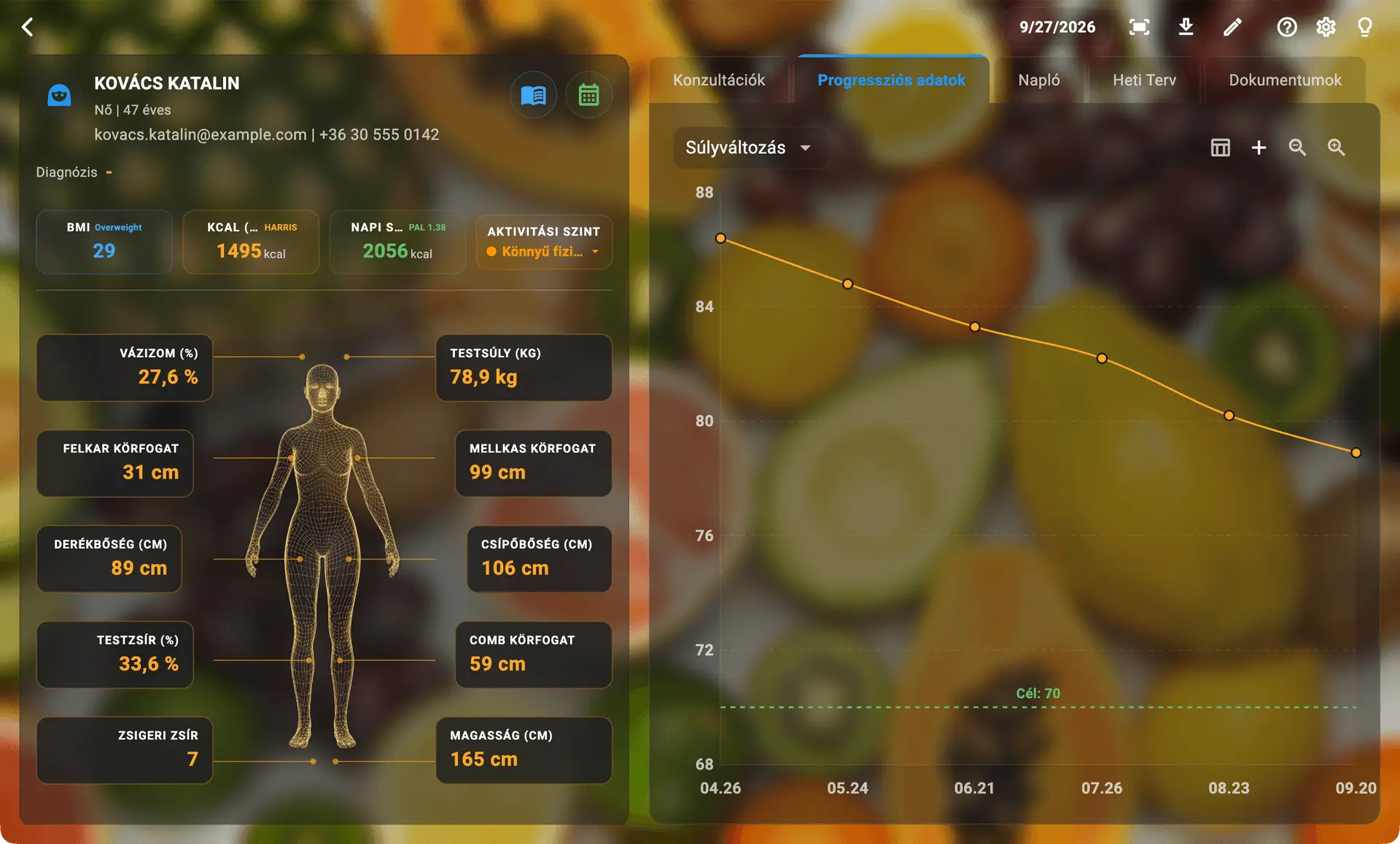
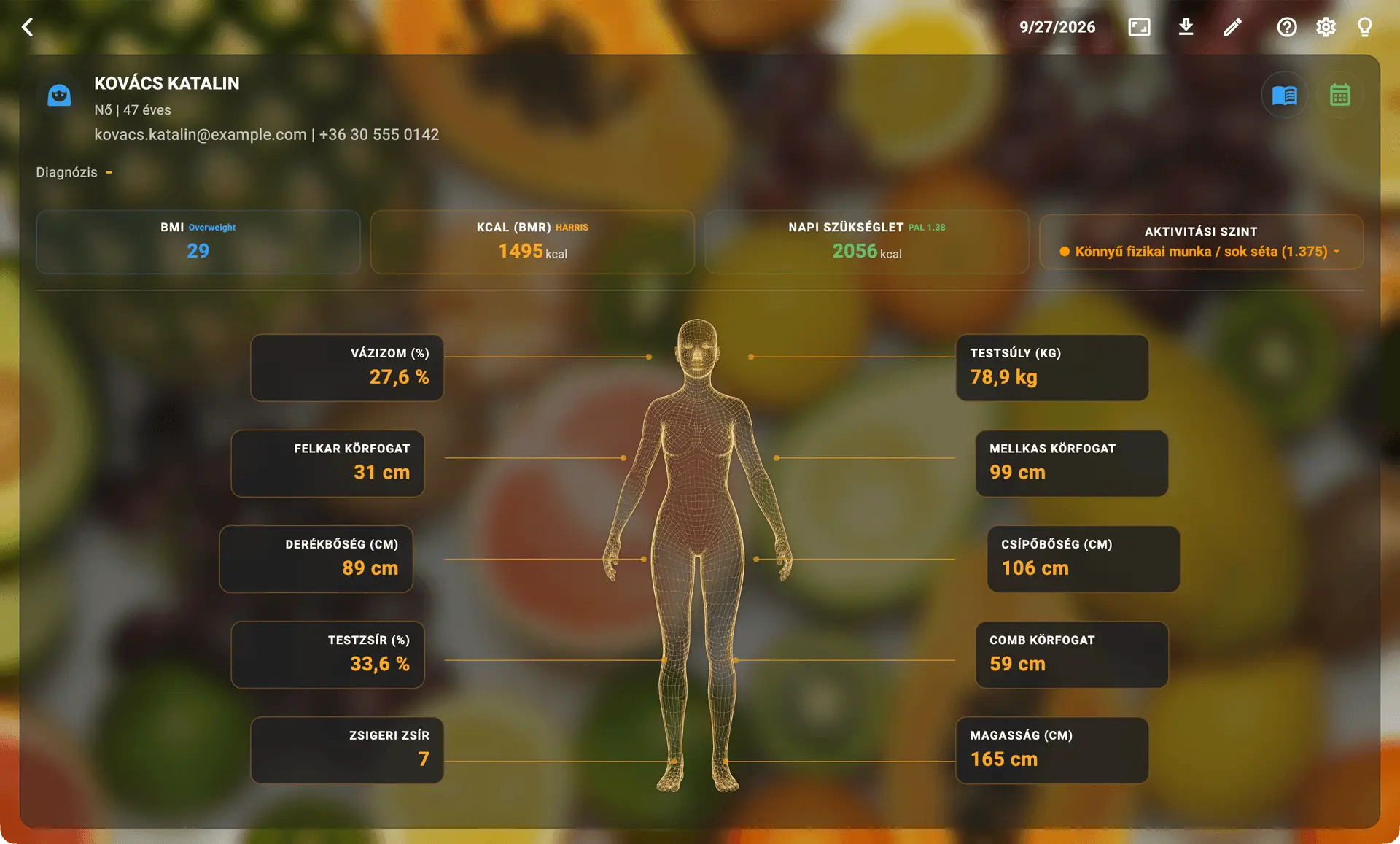
The Digital Twin dashboard: BMI, BMR, daily energy requirement and measured body composition on a patient record.

Why Dietly!?

What Dietly! actually does

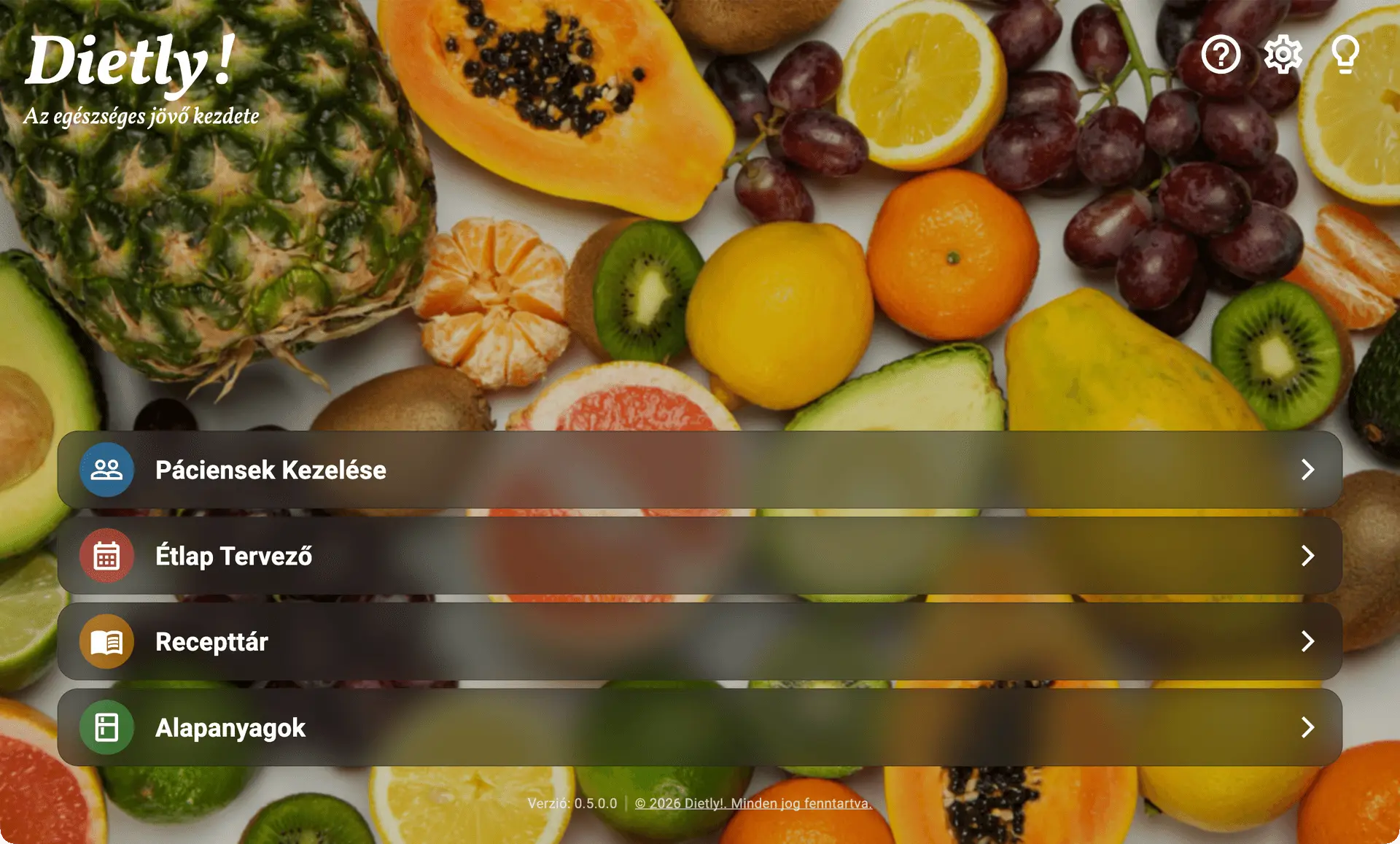
The home screen with its four main modules: Patient Management, Meal Planner, Recipe Library and Ingredients.

The home screen: four modules, one click away

On launch you land on the home screen: one click reaches each of the four main modules the app is built around, and the arrow in the top-left corner brings you back from any of them.

  • Patient management — client records, body measurements, the Digital Twin, the clinical journal, documents.
  • Meal planner — building daily and weekly meal plans, nutrient calculations, PDF export.
  • Recipe library — managing your own and the built-in recipes, and building a recipe book.
  • Ingredients — browsing and extending the raw-ingredient database.
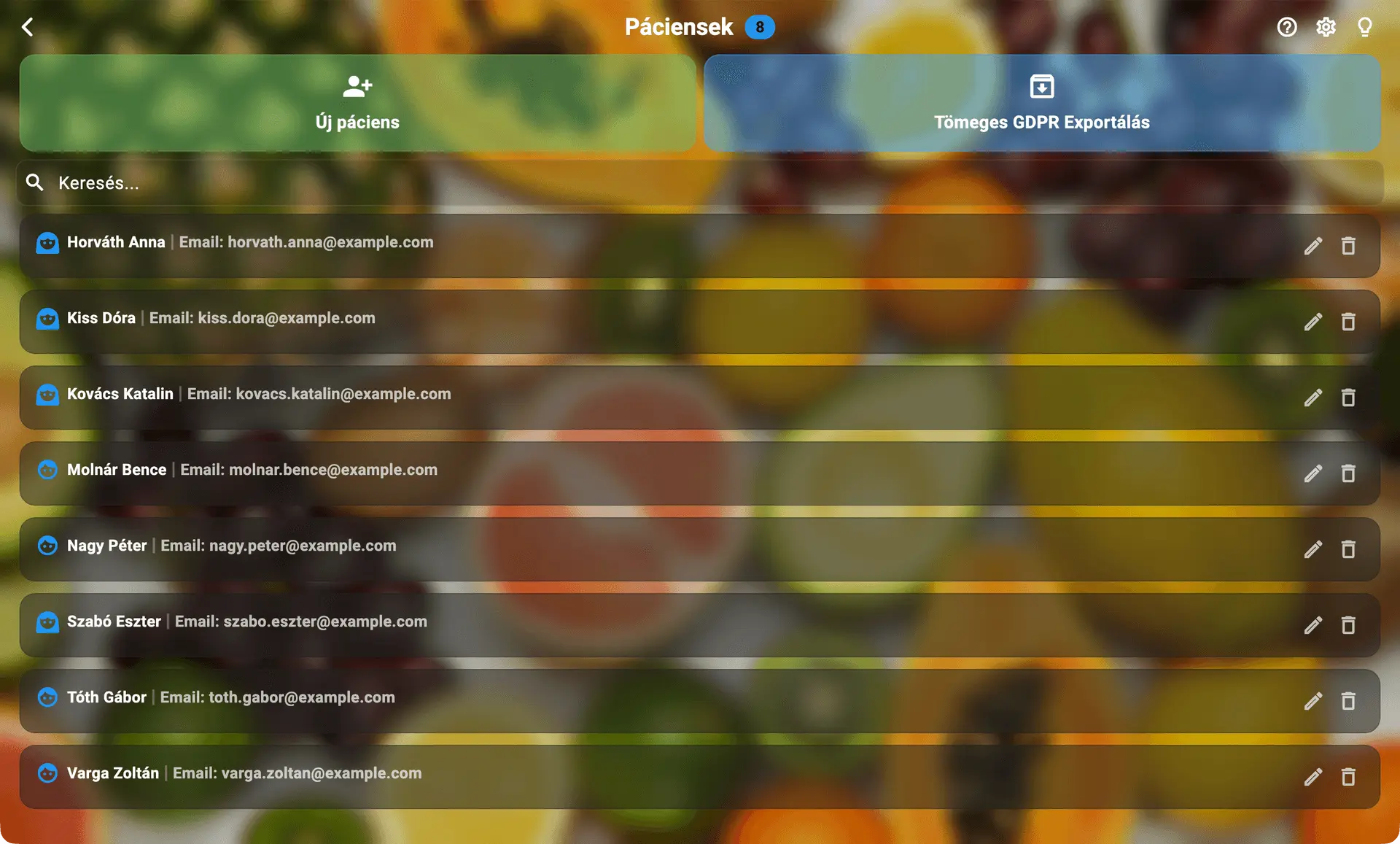
The patient list with search, new patient entry and bulk GDPR export.

Complex patient records and the Digital Twin

At the centre of every patient record sits the Digital Twin: a visual biometric model that shows BMI, BMR and daily energy needs in real time, calculated from height, weight, activity level and body measurements.

  • Choose from four recognised BMR formulas: Harris-Benedict and Mifflin-St Jeor for adults, Katch-McArdle for athletes with a reliable body-fat percentage, and Schofield automatically for patients under 18.
  • The Clinical Folder tracks weight, body fat, muscle mass and waist circumference on trend charts, and lab results attach encrypted, up to 25 MB per file.
  • The meal diary compares exactly what was planned against what the patient actually ate.
The Clinical Folder’s trend view: body weight month by month, with a line marking the agreed target.

Progress: what the series of measurements shows

A single measurement says little; the direction says a lot. On the Clinical Folder’s progress tab the recorded values appear as a time series, so one glance shows whether the patient is holding course.

  • A dropdown picks which recorded value the chart plots — body weight, for instance.
  • The agreed target runs across the chart as its own line, so the remaining distance is always visible.
  • Measurement points are dated and follow one another at the rhythm of the consultations.
  • The chart stays inside the patient’s own record, beside the Digital Twin and the diary - not in a separate spreadsheet.
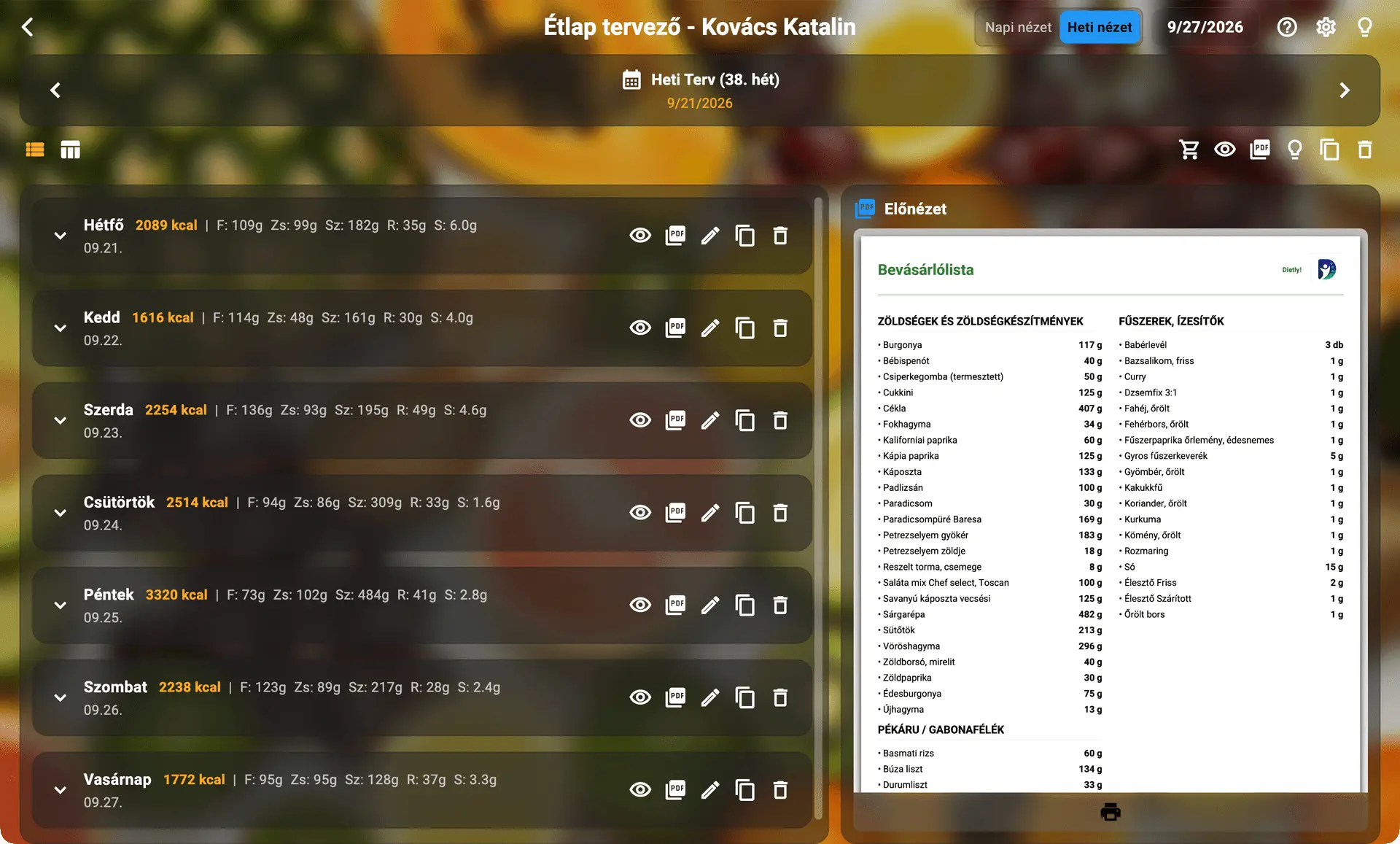
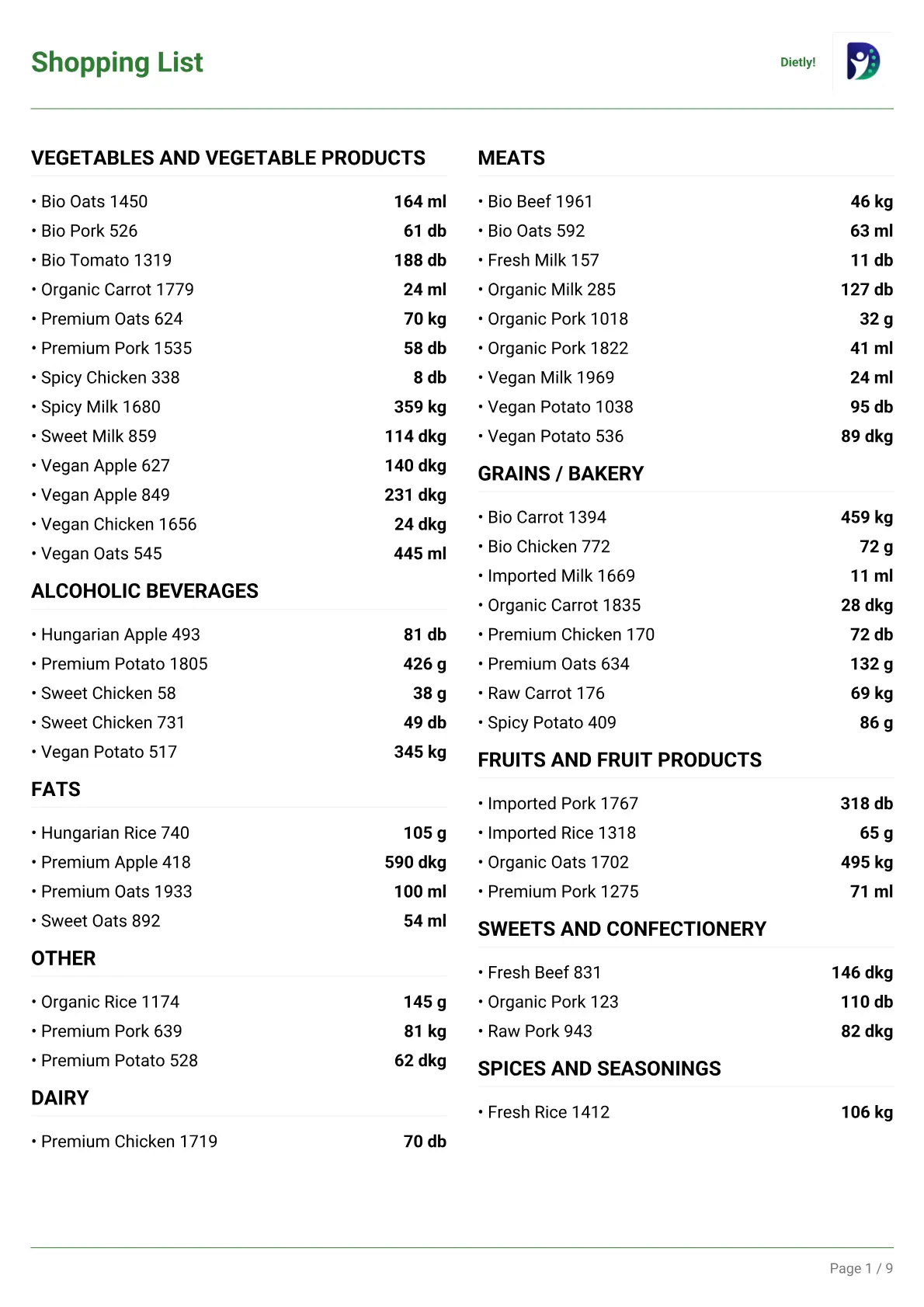
The meal planner in weekly view: each day broken down by nutrient, with a live preview of the printable shopping list beside it.

An intelligent planner with a widescreen mode

On a desktop monitor the planner switches to widescreen mode: the weekly navigator, the selected day’s plan and the catalogue all sit side by side, and in weekly view a live preview of the printable PDF updates as you work.

  • Local override: adjust a recipe for one patient on one day - less oil, an ingredient left out - without touching the original in the catalogue.
  • A red icon flags an ingredient on the patient’s medical allergen list; a yellow icon flags a disliked food.
  • On a workout day, the built-in MET calculator raises the daily calorie budget based on the patient’s own TDEE.
  • Time-travel protection: a plan can’t be copied onto a day that’s already past, so historical data can’t be overwritten by accident.
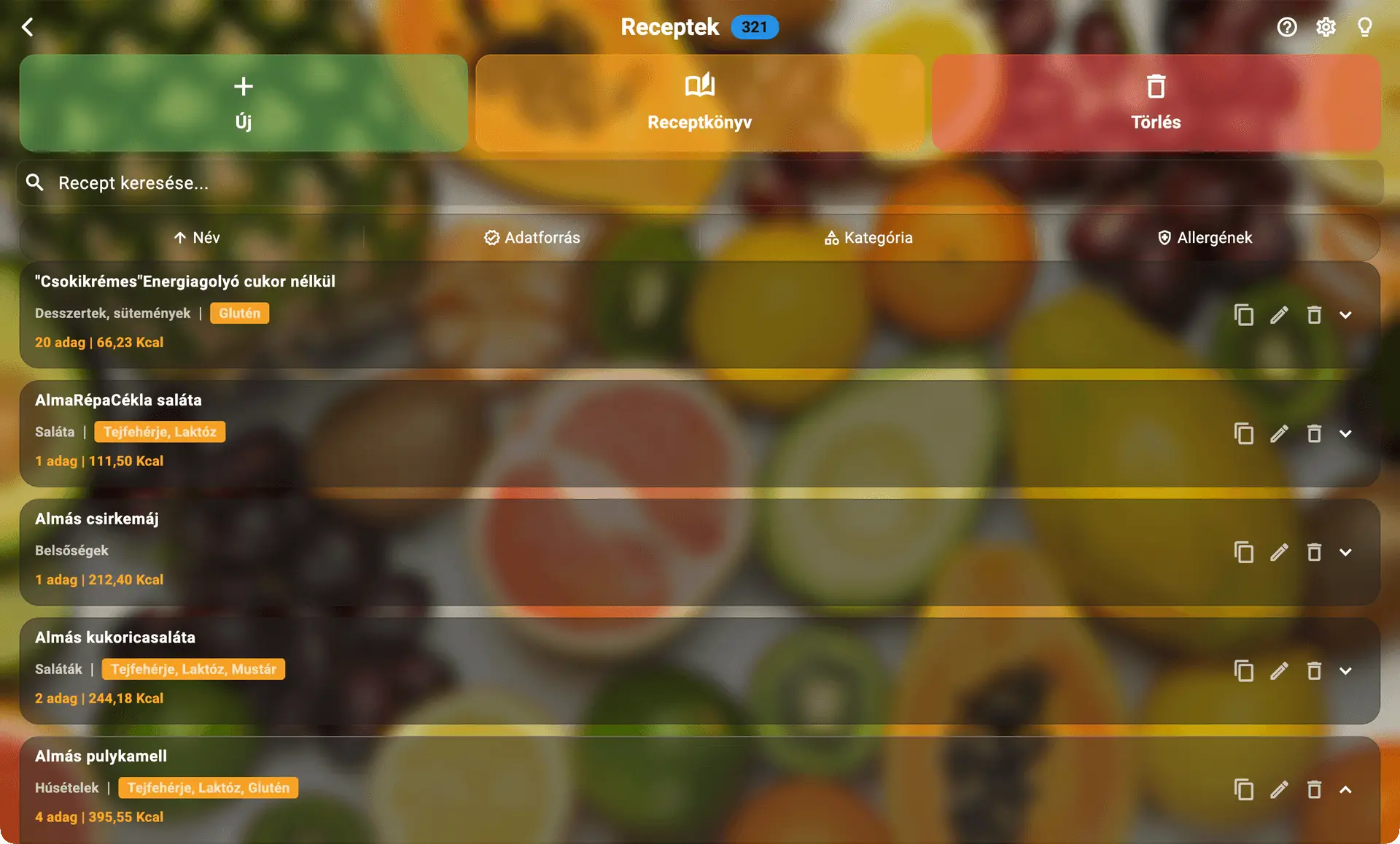
The recipe library: recipes with their category, number of servings and calories per serving.

The recipe library and the Ghost Trace mechanism

The typo-tolerant search treats built-in and your own recipes the same way; edit a built-in one and the app quietly creates your own copy, leaving the original untouched.

  • Mark a recipe indivisible for foods that exist as physical units - a cake, a muffin - and the app never lets a meal plan or shopping list show a meaningless fraction of one.
  • Ghost Trace: deleting an ingredient or recipe doesn’t distort earlier meal plans, because its name and data are kept in the background for historical calculations.
  • Select several recipes and generate one PDF recipe book in a click, complete with its own cover and - for more than two recipes - a clickable table of contents.
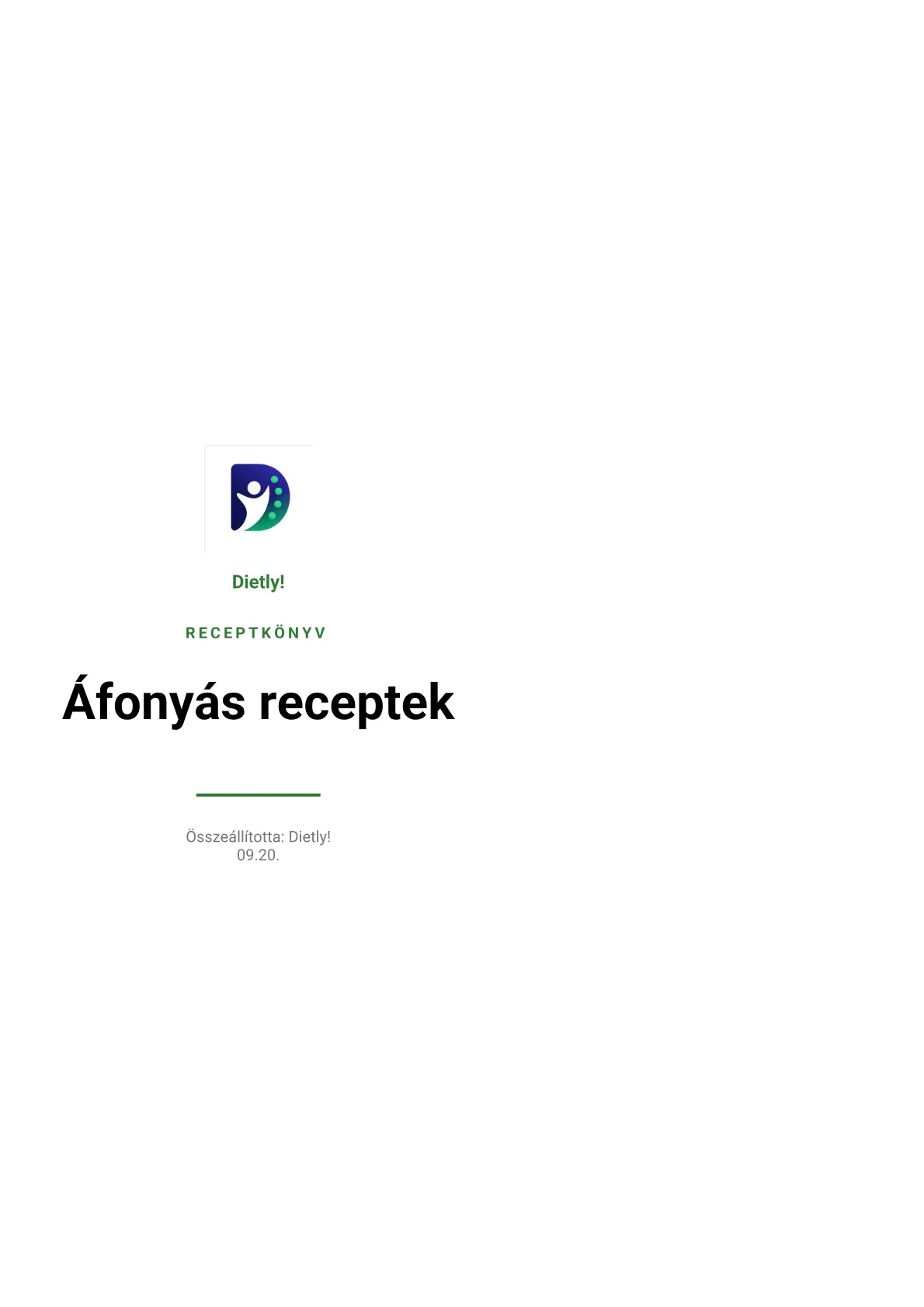
Cover of a recipe book exported from Dietly!, titled “Áfonyás receptek” — Blueberry recipes.

Recipe book

Pick recipes straight from the library and compile them into a recipe book with one click - put together specifically what a given patient can confidently cook, since every recipe card already carries its allergen tag. Hand over the finished, clean PDF directly, making everyday life that bit easier for the patient.

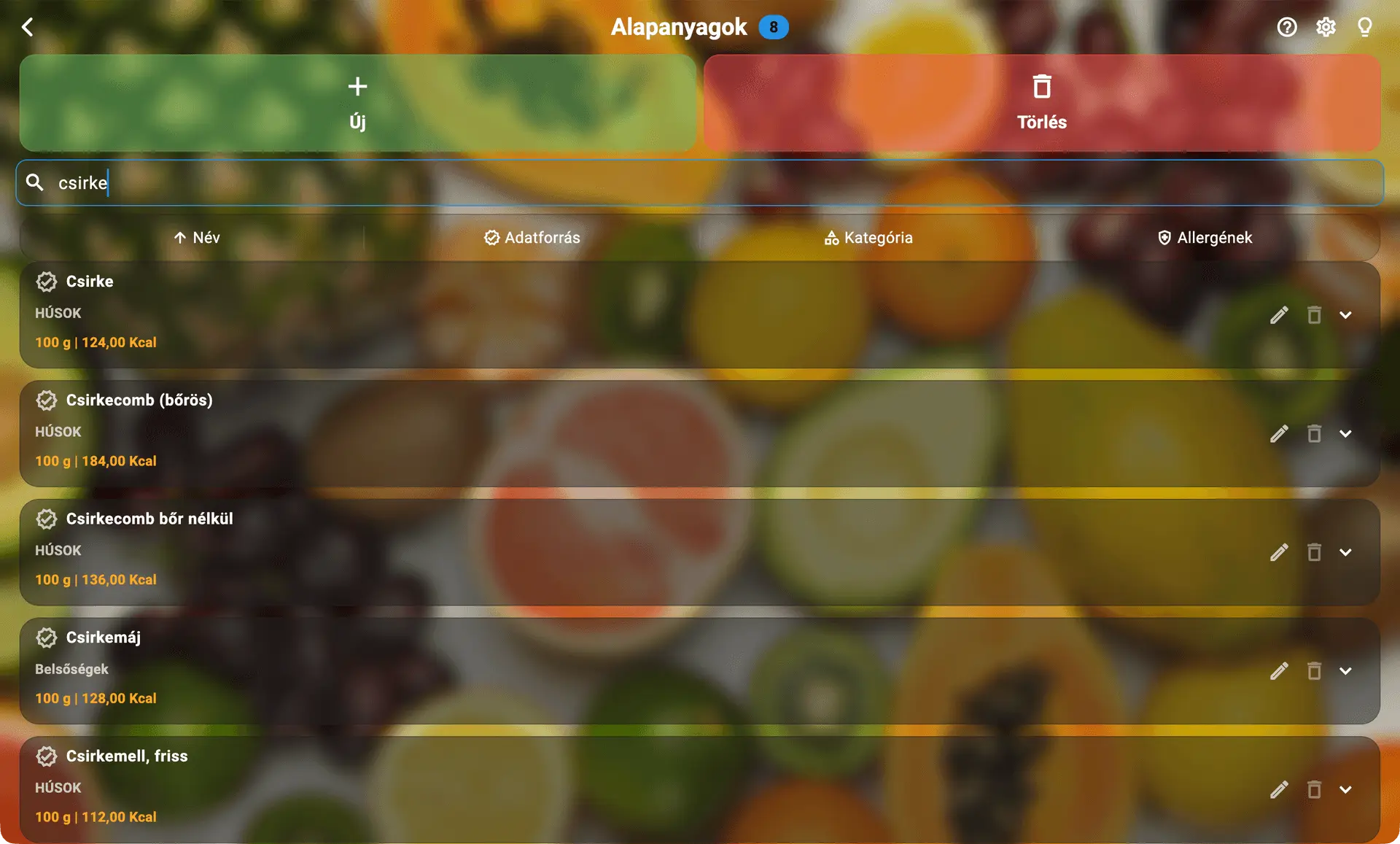
The Ingredients module: the raw-ingredient database with category, calories per 100 g and allergen markers.

Ingredients: the database every number comes from

Every recipe and every meal plan calculates from this raw-ingredient database. Each row carries its category and the calories per unit - usually per 100 g - with an orange marker where the item contains an allergen.

  • The search is typo-tolerant, so a small slip still finds the item. Filter by source, category and allergen; sort by name or calories.
  • Click a row and the full nutrient table opens: energy, protein, fat, saturated fat, carbohydrate, sugar, fibre, salt, plus any vitamins and minerals recorded.
  • A built-in item cannot be deleted, only edited - and editing quietly makes your own copy, so a later update never overwrites your change.
  • Before deleting, the app shows how many recipes and meal plans use the item; the whole catalogue imports and exports as CSV.
The first page of an exported weekly meal plan: an A4 PDF with the patient name, the days of the week and the nutrients per meal.

Printing and export

Every document is a clean A4 PDF, ready to hand straight to the patient.

  • The daily PDF carries the day’s plan, its shopping list and recipe cards; the weekly PDF adds a landscape weekly grid, a categorised shopping list and prep tips.
  • Every export’s header carries your practice and company name, its footer your contact details - and the Dietly! logo stays on every document as its publisher mark.
  • The recipe book’s cover can carry your own name and company, or stay neutral and unbranded - your choice each time.
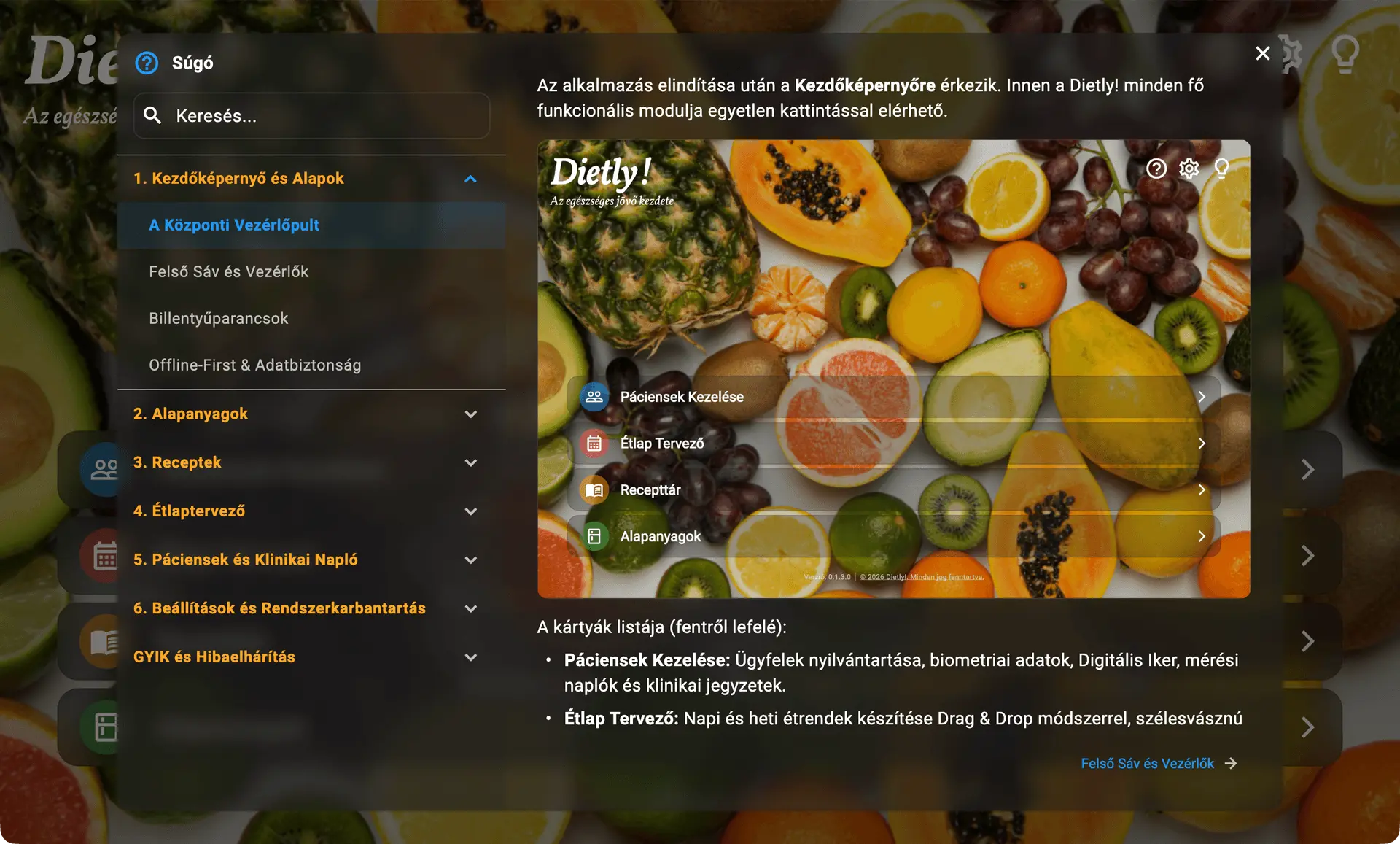
The built-in Help Centre: a searchable manual in chapters, with screenshots, its own FAQ and troubleshooting.

A built-in Help Centre for when you get stuck

The question-mark icon opens the app’s own manual: in chapters, with screenshots, and searchable. No leaving the app, no hunting for documentation elsewhere.

  • The chapters walk through everything from the home screen to ingredients, recipes, the planner and the settings.
  • It carries its own FAQ and troubleshooting chapter.
  • The Help Centre opens even while the app is running in read-only mode.
  • For a technical fault, the light-bulb icon builds a diagnostic package for the developers - worth attaching when you ask for help.

Data security and offline benefits

  • Works offline

    The app runs offline-first. A connection is only needed for the periodic Microsoft Store licence check, with a 24-hour grace period - a clear banner appears once under 12 hours remain.

  • Privacy by design

    Sensitive health data lives exclusively on your own computer, in a local database encrypted with AES-256 (SQLCipher). Not a single patient record reaches the developer’s servers.

  • Sync between two machines

    Keep your practice and home machine in step through your own cloud folder (OneDrive, Google Drive, Dropbox). The sync password never reaches that storage - only an unreadable copy does.

  • GDPR and data retention

    After 180 days of inactivity the app flags a profile for review, and a single click - one record at a time or in bulk - exports or deletes the affected patient data.

Frequently asked questions

What does it cost, and what changes in November?

Dietly! can be downloaded freely by anyone from the Microsoft Store — no invitation, waiting list or prior authorisation. Every feature is free until 1 November 2026. From that date use requires a subscription, also obtained through the Microsoft Store; the app shows a notice when the date is reached.

Which operating systems does Dietly! run on?

64-bit Windows 10 and 11 for now. Installation needs no administrator rights: the app installs into your user profile, and the installer offers a desktop shortcut.

Does it really work offline?

Yes. Every feature runs without an internet connection and your data stays on your own machine. A connection is only needed for the periodic licence check; if you happen to be offline, the app keeps working through a 24-hour grace period, and a clear banner appears once the final 12 hours are running out.

Can I use it on two machines — at the practice and at home?

Yes. Pick a cloud folder — OneDrive, Google Drive, Dropbox or even a network drive — set a sync password, and the app keeps both machines in step in the background. There is no central server: the data is already encrypted before it leaves your machine, so the cloud provider cannot read it either.

Is Dietly! a medical device?

No. It is a passive administrative and calculation aid: on its own it gives no dietary or medical advice and makes no diagnosis. BMR, BMI and TDEE values are based on recognised formulas, but composing the diet and judging the patient’s condition remain the professional’s responsibility.

Didn’t find your answer?

Get help

Ready to give it a try?

Download it from the Microsoft Store and see for yourself how Dietly! lightens the everyday admin work. Every feature is free until 1 November 2026.

Get it on Microsoft Store